
On March 6, 2026, OpenAI announced a major upgrade to its research workspace Prism, upgrading the underlying model from GPT‑5.2 to GPT‑5.3 and deeply integrating Codex CLI (a command‑line code agent). The update transforms Prism from a simple LaTeX editor into a true end‑to‑end research platform: researchers can write papers, search literature, run code, analyze data, generate charts and compile LaTeX in the same browser window, without switching back and forth between VS Code, Overleaf, Zotero, Python environments and plotting tools. OpenAI's official blog and the Prism page state that the upgrade aims to "end fragmentation of research tools" and make GPT‑5.3 + Codex CLI researchers' "full‑stack intelligent assistant."
Prism was first launched on January 27, 2026, originally integrated with GPT‑5.2 and offering a free native LaTeX workspace with unlimited projects, collaboration and compilation. With this upgrade, Prism is now available to all ChatGPT personal accounts (Free, Plus, Pro), and business/enterprise customers will gradually receive enhanced capabilities. After the upgrade, researchers reported a "3–5× increase in research efficiency", especially for multi‑file large papers and projects combining code and figures.
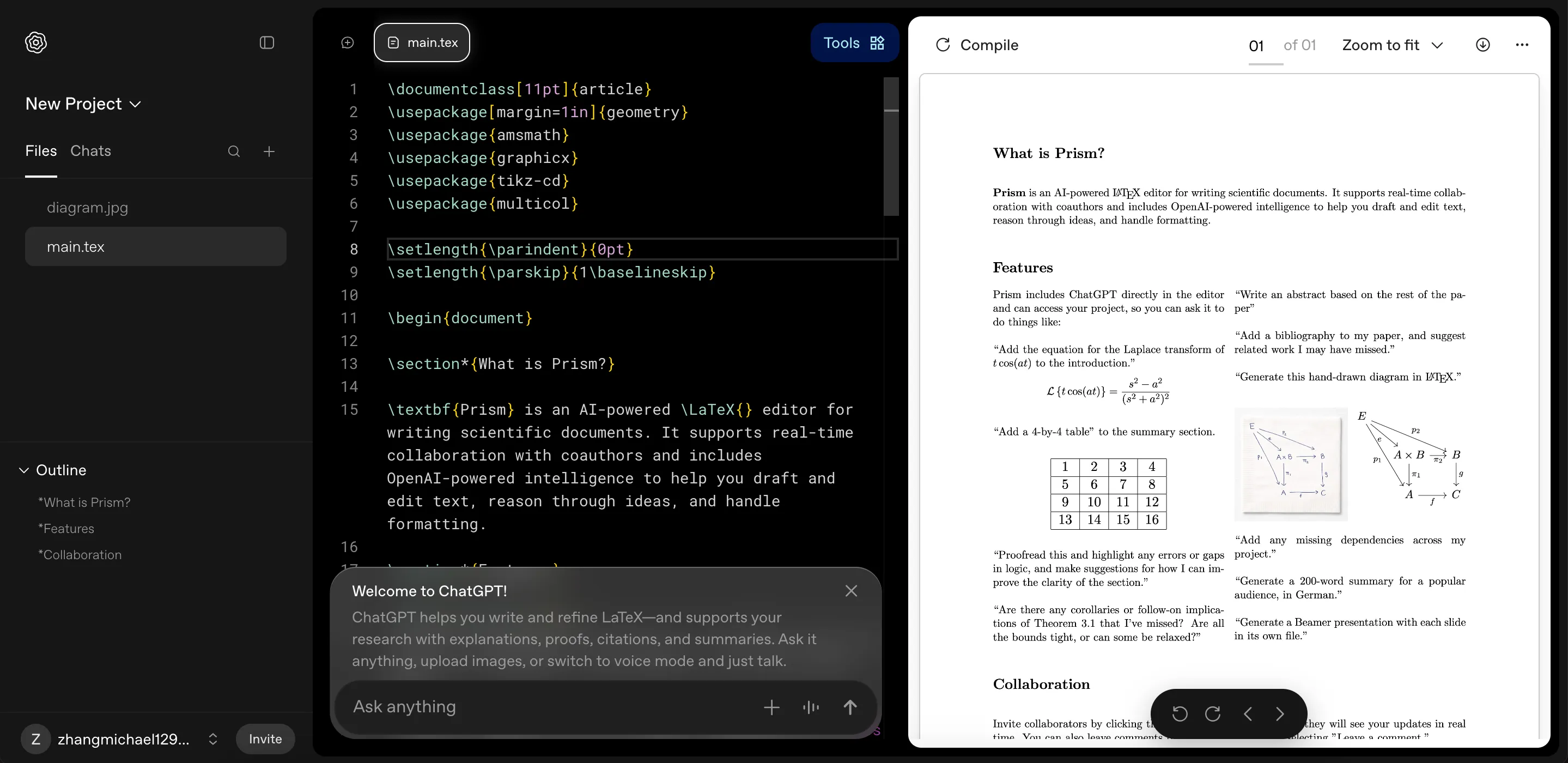
Key Prism Upgrades
- GPT‑5.3 delivers million‑scale contextual understanding GPT‑5.3 optimizes memory‑compression techniques to maintain logical coherence when handling hundreds of pages or multi‑file projects. The project‑aware AI can automatically read the entire manuscript context, including history, equations, citations and figures, enabling intelligent polishing, logical checks and structural optimization.
- Deep Codex CLI integration enables in‑platform code execution The headline change is the built‑in Codex CLI (Rust‑rewritten). Researchers can run Python and R code directly inside Prism for data cleaning, numerical simulation and statistical analysis, and instantly generate publication‑quality vector figures (SVG/PGF) without switching to a terminal or Jupyter Notebook.
- One‑click image‑to‑code and equation conversion Prism supports an "Image to Code" feature: upload hand‑drawn sketches, whiteboard photos or screenshots and the AI converts them into standard LaTeX or TikZ/PGFPlots drawing code. A built‑in equation converter turns handwritten formulas into LaTeX and auto‑corrects them.
- Real‑time collaboration and intelligent fixes Unlimited collaborators can edit in real time, and the built‑in "Fix with AI" button repairs compile errors, citation formatting issues and logical bugs with one click. Zotero sync lets users search literature and insert citations directly.
Detailed usage (step‑by‑step illustrated guide)
Prism is entirely browser‑based and requires no local software installation. The complete workflow (based on official documentation and user testing) is as follows:
Step 1: Enter the Prism workspace
- Open your browser and go to https://prism.openai.com
- Sign in with your ChatGPT account (Free users can access all basic features)
- Click "New Project" to create a project or import an existing Overleaf/local LaTeX project (one‑click import of .tex and .bib files supported)
Step 2: Writing and AI‑assisted editing
- Write directly in the LaTeX editor on the left (real‑time preview supported).
- Select any paragraph or equation and open the right‑hand "AI Assistant" panel:
- Enter commands such as "Polish this discussion to match Nature style"
- "Convert this handwritten equation to standard LaTeX and check consistency"
- GPT‑5.3 will read the entire project context, offer edits and apply them directly.
Step 3: Run code and generate figures (Codex CLI core features)
- Insert code blocks in the editor (Python/R supported).
- Click "Run with Codex" in the code‑block corner:
- The system executes code in a cloud sandbox (supports common libraries like numpy, pandas, matplotlib, scipy).
- Results (tables, statistics) are displayed inline.
- Click "Generate Figure" to convert outputs into academic vector figures (PGF/TikZ) and insert them into LaTeX.
- Example prompts (enter in the chat):
- "Generate a line chart with error bars from the current data and insert it in Section 3"
- "Perform PCA on the attached CSV and output a LaTeX table"
Step 4: Compile, fix and collaborate
- Click the top "Compile" button; Prism's built‑in LaTeX engine compiles instantly (unlimited compilations).
- If errors occur, click "Fix with AI" and GPT‑5.3 will diagnose and repair them (common issues include citations, packages and image paths).
- Invite collaborators by clicking "Share" to generate a link; others can edit and comment in real time while the AI summarizes discussions.
Step 5: Advanced features and export
- Voice input: "Voice to Code" lets you speak to generate code or edit text.
- Bibliography management: connect Zotero, search by keyword and insert citations.
- Final export: one‑click PDF generation and arXiv submission format optimization.
The entire workflow can be completed in the browser, saving an average of 10–20 hours per paper in tool switching and debugging.
Actual results and researcher feedback
Based on early users (Nature, Science researchers) and aibase.com testing:
- Writing a 15‑page paper from draft to submission‑ready version was reduced from three weeks to 5–7 days.
- Code and plotting steps improved efficiency by more than 5× (previously required switching between Jupyter, Origin and Overleaf).
- Suitable fields include theoretical physics, machine learning, bioinformatics and economic modeling—disciplines that require many equations, code and figures.
Notes and limitations
- Free tier: Free users are subject to reasonable use limits; complex code runs or very large projects are recommended for Plus/Pro plans.
- Network requirements: All operations run in the cloud and require a stable connection (offline use is not currently supported).
- Data privacy: Project files are stored on OpenAI's cloud; sensitive research data should use the enterprise plan or local backups.
- Current limitations: Extremely large parallel computations (million‑line codebases) still require local environments, and accuracy for complex chemical structure drawing needs improvement.
Conclusion: The research workflow revolution has arrived
The OpenAI Prism + GPT‑5.3 + Codex CLI upgrade realizes a true "idea‑to‑paper" one‑stop workflow. It frees researchers from fragmented toolchains and lets them focus on scientific thinking. This tool not only greatly improves individual research productivity but may also reshape academic publishing workflows.
In 2026, when AI accelerates scientific discovery, Prism may be just the beginning. As GPT‑5.3–level assistants become standard for researchers, the speed and depth of human scientific exploration may reach a new level.
▶️ Enjoyed this article? Creating content is hard!
Follow our YouTube channel:
AI Rosetta
Your likes, subscriptions and shares are our greatest support! 🙏
More AI news at: https://www.airosetta.com