
Notion and NotebookLM, as two of the most popular online note‑taking tools today, have attracted growing attention and users. How should you choose between them? What are the functional differences? Below is a detailed explanation to help your decision.
Different Core Positioning & Design Goals
NotebookLM: Primarily positioned as an AI‑driven "research/literature/knowledge整理 + analysis" tool. Users upload documents (PDFs, web pages, Google Docs, videos, links, etc.) as "sources", then use AI to "summarize, distill, answer questions, and generate study maps/outlines/FAQs/podcasts/audio briefs" from those materials. If you need to quickly digest, understand, or research a large amount of external material, it can be very useful.
Notion: Is a more versatile/flexible "second brain"/workspace — supporting notes, databases (table/list/board/gallery/calendar), task management, project management, document writing, team collaboration, and knowledge‑base construction. It is more like a general‑purpose platform for knowledge + projects + team collaboration. AI features (if using Notion AI) only enhance writing/summarization/prompts/autocomplete and are not the core.
One‑sentence summary: NotebookLM ≈ "an AI assistant that helps you read, understand, summarize materials and do research/study"; Notion ≈ "your basecamp for building an information system + team collaboration + project/knowledge management".
A table to understand the differences
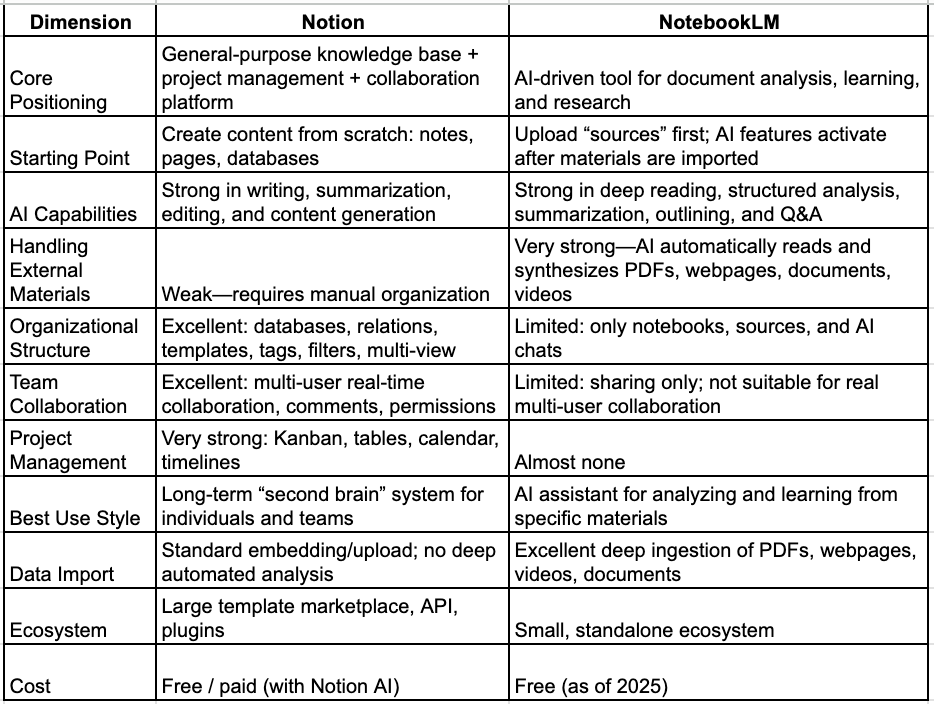
Depth of Features Comparison
1) AI capability differences (key)
🔵 NotebookLM (analysis > generation)
- Automatically generates summaries, outlines, FAQs, tables, timelines
- Understands multiple files and builds a unified knowledge graph
- Supports "Q&A based on your uploaded materials"
- Can automatically produce audio podcast‑style explanations
- Suitable for professional reading/study/research
- For example: give NotebookLM 30 industry reports, and within seconds it can produce a 10‑page summary
🟣 Notion AI (generation > analysis)
- Assists writing, summarizing, polishing, translating
- Weaker at analyzing external materials
- Better suited for:
- generating project documents
- writing
- helping brainstorm
- optimizing existing content formatting
In short: NotebookLM "helps you read"; Notion "helps you write."
2) Organization structure capability (Notion dominates)
Notion:
- Unlimited nested pages
- Relational databases
- Tags / properties / filters / aggregations
- Boards / calendars / timelines
- Template system
- Bidirectional links
Suitable for building large systems, for example:
- Knowledge bases
- Product documentation
- Project management systems
- Personal second brain
- Team collaboration hub
NotebookLM:
- Notebooks
- Sources
- AI Chat
Pros: Simple
Cons: Not extensible; cannot form complex organizational structures.
3) Project management capability (Notion > NotebookLM)
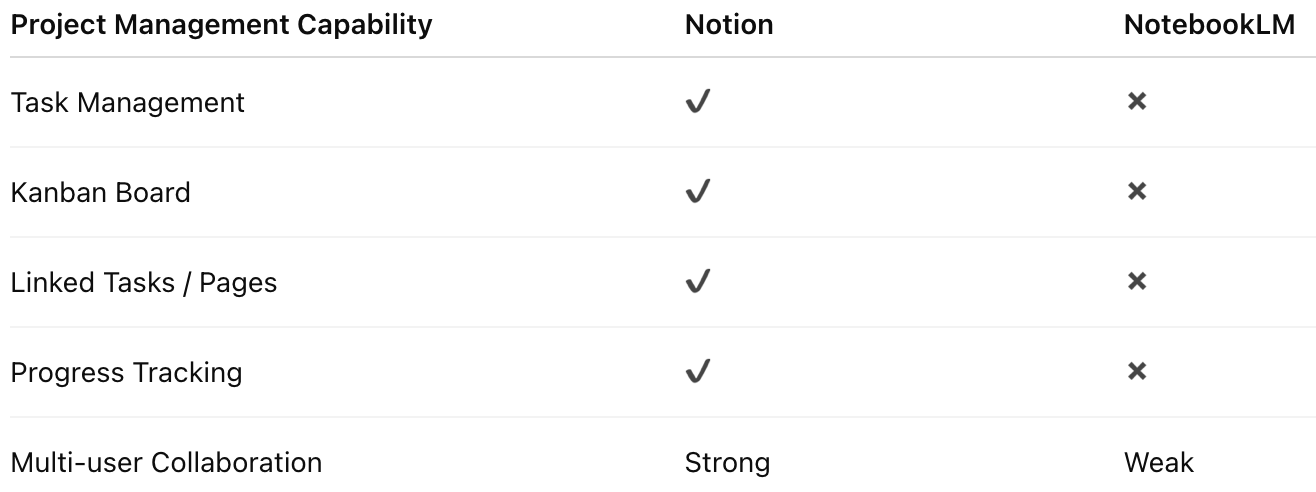
Recommended Use Cases
✔ When to use NotebookLM?
Highly suitable for:
- Reading大量 materials (reports, papers, web pages, white papers)
- Academic research and literature整理
- Preliminary content production: research + outline generation
- Quickly understanding industry trends
- Generating structural drafts when writing articles
- Automatically generating素材 for PPTs and reports
- Self‑study / course learning
Example:
Upload 5 papers + 1 PDF report
→ Get outlines, summaries, key points, controversies, trend analysis
→ Ask directly: which research conclusions conflict? which model performs better?
This is something Notion cannot do.
✔ When to use Notion?
Better for:
- Knowledge management (second brain)
- Work / life planning
- Enterprise and team collaboration documentation platforms
- Product requirement documents (PRD)
- Development project management
- Database‑driven content
Example:
You need a long‑term maintained knowledge center
- Project management
- Documentation systems
- Team collaboration
- → Use Notion.
Best practice: Use both together (strongest combination)
Many professionals (developers, consultants, researchers, students, content creators) adopt:
NotebookLM = material ingestion + analysis
- Input: PDFs, papers, articles, reports, web pages
- Output: summaries, outlines, insights, controversies, observations
Notion = organization + long‑term management + reuse
- Store NotebookLM outputs in Notion
- Add tags, archive, link databases
- Combine with task management and project documentation
This combination yields the highest efficiency.
Conclusion: Recommendation
If you can only pick one:
✔ "You want to improve comprehension"
👉 Choose NotebookLM
✔ "You want to improve organization"
👉 Choose Notion
✔ "You want to improve overall efficiency"
👉 Use both
▶️ Enjoyed this article? Creating great content takes effort!
Subscribe to our YouTube channel:
AI Rosetta
Your likes, subscriptions and shares mean the world to us! 🙏
For more AI news, visit:
https://www.airosetta.com