
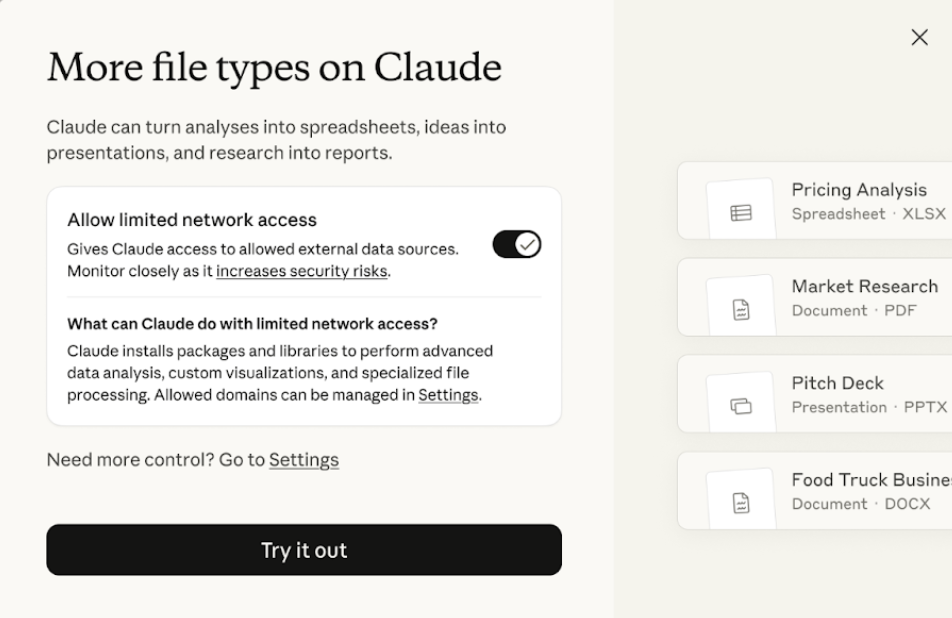
As early as September 2025, AI company Anthropic rolled out a transformative update to its Claude AI model: users can create and edit Excel spreadsheets (.xlsx), PowerPoint presentations (.pptx), Word documents (.docx) and PDF files directly in the browser. This capability marks Claude’s shift from a conversational assistant to a productivity tool, helping users handle office tasks more efficiently. According to Anthropic’s official support pages and blog announcement, the upgrade is built on enhanced capabilities in the Claude 3.5 Sonnet model and is designed to simplify file workflows and avoid manual copy‑and‑paste after AI generation. TechCrunch and Simon Willison described the feature as "turning Claude into a file collaboration partner," particularly useful for data analysts, content creators and enterprise users. As of January 2026 the feature is integrated into Claude’s web interface and API; user feedback has been positive but some limitations have emerged. This article draws on Anthropic’s official documentation, YouTube demos and tutorials from Apidog and Sider to explain technical details and focus on how to use the feature.
Technical background: Claude's file handling mechanism
Claude’s file creation and editing capabilities are built on its advanced document understanding and generation features. The Claude 3.5 Sonnet model supports multimodal inputs, including text, images and code, can parse uploaded file structure and produce compatible output formats. This functionality does not rely on external plugins but operates via browser‑side JavaScript and Claude’s API: after a user uploads a file, Claude processes it in the cloud and generates a downloadable modified version. For example, when handling Excel files Claude can recognize cell data, formulas and charts, perform calculations, clean data or generate visualizations; for PowerPoint it supports slide layouts, text insertion and image addition; for PDFs it can extract content, annotate or reflow layout.
From a technical perspective the feature leverages Claude’s "tool use" capability, allowing the model to call a built‑in file generator. Anthropic stresses privacy: file data is used only for the current session and is not stored in training datasets. Compared with competitors that use plugin models such as ChatGPT, Claude’s integration is more seamless and does not require switching applications. Reddit users report the feature performs well on complex data but hallucination risks remain, for example occasionally producing incorrect logic in Excel formulas.
How to create and edit files with Claude: step‑by‑step guide
The file feature is simple to operate in the browser; users just visit claude.ai or use the Claude API. The following steps are based on official guides and YouTube demos.
- Sign in and start a new conversation: Open your browser, go to claude.ai and sign in to your Anthropic account (the free tier supports basic features; Pro offers unlimited sessions). Click "New Chat" to start a new conversation.
- Upload a file (optional, for editing): To edit an existing file, click the upload button at the bottom of the chat interface and drag‑and‑drop or select a file. After uploading Excel, PowerPoint, Word or PDF files, Claude automatically parses the content and asks about the intended action. For example, when you upload an Excel file Claude shows a data preview and you can enter a request such as "Analyze sales data in column A and generate a bar chart."
- Provide prompts to create or edit: Describe your needs in natural language. Example for creating a new file: "Create an Excel sheet with 2025 sales data, first column Month, second column Sales, generate a line chart." Claude will produce a file preview and you can further modify it, e.g. "Add a growth‑rate formula in column C and highlight the maximum value." For PowerPoint: "Create a 10‑slide PPT on AI trends, with a title slide, table of contents on slide 2, include images and animations." For PDF: "Generate a PDF from the uploaded Word document and add a header and watermark." Prompting tips: being specific (e.g. "use a blue‑themed bar chart") improves results.
- Preview and iterate: After Claude generates the file it shows a preview (tables for Excel, slide thumbnails for PowerPoint). You can request changes such as "adjust chart colors" or "add data validation." Iterate until satisfied, then download.
- Download and export: Click the generated link to download the file. The free tier limits file size (around 100MB); Pro supports larger files. API users can call endpoints in code, for example using the Python anthropic library to send prompts and receive a file URL.
Notes: file processing occurs in the cloud, so ensure a stable network; complex formulas may require manual verification; real‑time collaboration is not supported.
Advantages, limitations and industry impact
The benefits are clear: efficiency, low cost and flexibility. Sider tutorials note the feature can compress hours of work into minutes, especially for data analysis. The eEsel AI blog highlights that it simplifies report generation for enterprise users. Limitations include hallucination risk (such as erroneous formulas in Excel) and format compatibility issues (some complex layouts may not be supported). On privacy, Anthropic pledges not to store files, but users should avoid uploading sensitive data.
The industry impact is significant: the feature challenges Microsoft Office’s dominance and accelerates adoption of AI‑powered office tools. TechCrunch predicts similar capabilities will become standard by 2027. In the future, Claude may expand to additional formats, such as Google Sheets integration.
In summary, Claude’s file creation and editing feature represents a leap from "chat" toward "production." With simple steps users can work efficiently in the browser. This innovation not only boosts productivity but also signals the broad potential of AI tools.
▶️ Enjoyed this article? Creating content is hard!
Follow our YouTube channel:
AI Rosetta
Your likes, subscriptions and shares are our greatest support! 🙏
More AI news at: https://www.airosetta.com